Latest Posts
Browsing Category "Windows 8"

With approachable price, recommendation of high popularity Win8 notebooks

- Wednesday, 4 September 2013 No Comments
The price is often the most important factor when purchase a notebook. So, what price range products are most welcome in the market? let's take a look. For high popularity notebooks, they often have stylish look and main current configuration, and they should be able to meet the consumers' general demands.

1. Samsung ATIV Book 9 Lite

Samsung ATIV Book 9 Lite is targeted at the mass consumer groups, and the high-end market. Through high-end exquisite appearance, sharp and smooth body design, it perfectly innovates the PC forms. The model uses metal wire drawing process, which is not only scratch-resistant, but also highlights calm and elegance. The edge of the frame has reached 16.9mm, and the opening and closing angle is 180°, which has truly integrates ultrathin and artistic.


Samsung 905S3G uses a 13-inch matte display. The glossy display looks very lovable, but it's prone to reflections and contaminated with fingerprints. The matte display can produce diffuse reflection, so there won't have strong reflection, and also the fingerprint hazard is much lighter.

As to the performance, Samsung 905S3G-K01 uses Samsung's customized version quad-core processor, X86 architecture 4GB RAM and 128GB SSD hard drive. It can perfectly run Photoshop, Word, Excel, Fireworks and other common office software.

2. ThinkPad E531


ThinkPad E531 (68854TC) laptop is an upgraded product of the previous generation E530 series, and also it's much thinner. It adds four shortcut keys, a key to calculate, a key to lock, a key to open the browser and a key to open My Computer, so the operation is more convenient.

As a business book, Lenovo ThinkPad E531 68854TC is equipped with a 15.6-inch LED display, Intel Core i5-3230M dual-core processor, built-in 4G DDR3 1600 RAM, 1000GB 5400 rpm mechanical hard drive, 2G video memory NVIDIA GeForce GT 635M independent graphics and a 720P HD camera. And also it's pre-installed Windows8 operating system.

3. Acer V5-471PG


Acer V5-471PG notebook is compact and thin, the top cover uses drawing process design which makes the A side more metallic, and also is not easy to leave fingerprints. It weighs 1.345kg, and travel weight is 1.529kg, which is very portable.

Acer V5-471PG doesn't use the Acer unique duckweed keyboard, but the popular chocolate keyboard which is easier to clean compared to the duckweed keyboard and dust-proof. It has a 14-inch wide screen, the highest resolution is 1366 × 768. This screen can be purchased from http://www.batterycentury.com.

Acer V5-471PG is with Intel i5-3317U dual-core processor, 2GB memory NVIDIA GeForce GT 620M discrete graphics that supports smart graphics switching and DirectX 11, 4GB memory and 500GB hard drive.

4. Lenovo IdeaPad Yoga 11


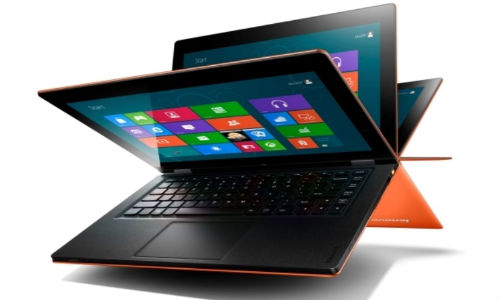
Lenovo IdeaPad Yoga 11 is equipped with a full-size keyboard, and it has a 11.6-inch AHVA wide viewing angle screen that supports up to five-point touch at the same time, and also it uses a 16:9 ratio structure, and it's with 1366x768 resolution. Tust above the screen there is a video camera, which has 1 megapixel and can record 720P video, the upper right of the screen is the light sensor.

Lenovo Yoga 11 uses NVIDIA Tegra quad-core processor T30, whose processing capacity is twice than the previous generation Tegra 2, 2GB DDR3L RAM, 32G SSD and NVIDIA Graphics. It has 802.11 BGN wireless LAN card and Bluetooth 4.0 module for networking. And also it has a 42Whr large capacity battery. It's worth mentioning that Lenovo IdeaPad Yoga 11 is also the first tablet notebook without a fan.

5. Sony SVE14A26CCB


Sony VAIO series notebooks are with beautiful appearance and good hardware quality, the folding body design has been loved by the majority, holding hands. The sides highlight the folding design features. It has a 14-inch LED-backlit widescreen with a screen ratio of 16:9 and a resolution of 1366*768. In addition to the black screen border and the border of both sides, Sony E14A26 notebook is with all-white appearance, the surface is coated with skin-like material, which touches comfortable. It's with the chocolate keyboard, and the keyboard top right corner provides four function keys, which are the optical drive ejection, a key recovery system, web browsing and VIAO service program. Sony SVE14A26EC body size is 341 mm x 22.4 mm x 245 mm, the top cover and the bottom are made of magnesium alloy.

In hardware configuration, it's with Intel Core i3-3110M processor, 2GB DDR3 RAM, 500GB 5400 SATA hard drive, built-in DVD burner, Intel 4000 and AMD HD 7670M dual graphics, 10/100/1000Mbps Ethernet card, 802.11a/b/g/n wireless LAN and Bluetooth 4.0.

6. Toshiba S40t


Toshiba S40t-AT01M notebook uses a 14-inch ten-point capacitive touch screen, which is covered with anti-fingerprint coating to bring high-quality touch experience. It's with metal material and drawing texture, the metal-plated edge technology produces large size touchpad and floating keyboard. It's equipped with two USB 3.0 interfaces, also it supports poweroff charging.

In the hardware configuration, the Toshiba Satellite S40t is equipped with third-generation Intel Core i5-3337U dual-core processor, 4GB memory, 500GB hard drive, and 2GB video memory NVIDIA GeForce GT740M discrete graphics.

7. HP 4441s


HP 4441s (D5J74PA) notebook has a very stylish metallic look. It's with a 14-inch LED backlit screen which can be purchased from http://www.batterycentury.com/ with a resolution of 1366*768 and 16:9 the golden ratio, also it has built-in audio chip, the overall sound effect is quite good.

HP 4441s (D5J74PA) uses Intel Core i5-3230M (2.6GHz/L3 3M) processor, 2G memory AMD Radeon HD 7650M graphics card, standard 4G memory and 640G hard drive. It also supports 802.11b/g/n wireless LAN, and it has two USB2.0 and two USB3.0 interfaces.

8. ASUS S550X3317CM


ASUS S550X3317CM uses a 15.6-inch HD screen, Intel Core i5-3317U processor, built-in ultrathin optical drive, Nvidia GT635M discrete graphics, SonicMaster, SSD and even a full-screen video conferencing HD camera, it can be absolutely called as the omnipotent WIN8 touch ultrabook.

ASUS S550X3317CM-SL is equipped with Intel Core i5-3317U (1.7GHz/L3 3M) dual-core processor, Intel HM76 motherboard chipset, with 500GB mechanical hard drive, and 4GB DDR3 1600MHz speed memory that maximumly supports 8GB. It's with Intel HD 4000 graphics card and 2GB NVIDIA GeForce GT 635M graphics card combination, which supports Optimus intelligent graphics switching.


Windows 8: 3 Hidden Features You Should Know

- Tuesday, 29 January 2013 No Comments

You already know my overall opinion of Windows 8: that it's two very good operating systems - one for touch screens, one for mouse and keyboard - idiotically superimposed on each other. You wind up with duplicate everything: two Web browsers, two help systems, two search features, two control panels (actually three, but never mind). It's very confusing. 
But for the last few weeks, I've been up to my neck in writing a how-to book on Windows 8, and that means mucking around in its deepest, darkest corners. That means learning its idiosyncrasies and quirks. That means getting to know its most embarrassing lapses and its most unsung brilliance. 

In the meantime, I thought I'd share three completely overlooked gems that I've unearthed in my explorations. 

Xbox Music
Don't be confused. In Windows 8, the term Xbox has nothing to do with the game console. It's now just a generic term that Microsoft puts on its online stores. Anyway, Xbox Music is a completely great music service . It combines elements of Pandora, in that it can play endless free music in a style you choose; Spotify, in that you can listen to any song or any album or any performer, on command , free; and iTunes, in that you can buy songs to download. It's a Windows 8 exclusive; it doesn't work on Windows 7. And it's free. 

Bing magazines
In TileWorld (my name for the second operating system, the full-screen , colorful, tappable tiles), you get a handful of brilliantly executed, full-screen , perpetually self-updating "magazines" for news, sports, finance and travel. 
Each, behind the scenes, is simply grabbing articles from hundreds of big-name news websites. No hard-to-read color schemes or ugly fonts. No blinking ads, banners or obnoxious animations. They all work essentially alike. 

Narrator
Those who are blind or have limited sight can use Narrator to describe every item on the screen, either in TileWorld or the desktop. It can describe the layout of the Web page, and it makes little sounds to confirm that you've performed a touchscreen gesture correctly. Even if you're not blind Narrator is still handy; it can read your email back to you, or read your web articles as you're getting dressed in the morning. 
When you open Narrator, you end up at its Settings dialouge box - and the voice of Microsoft David starts talking, reading everything on the screen. 
So yes, there is a lot of good in Windows 8, and a lot that's getting no press. Here's to the unsung engineers who came up with this stuff - and to the hope that Windows 8's split personality problem will somehow improve.

The Revolutionary Operating System Microsoft Windows 8 is Finally Here : Things You Need To Know

- Friday, 26 October 2012 1 Comment

So finally the most awaited operating system windows 8 is here. Microsoft Corp. today announced the global availability of its popular Windows operating system, Windows 8. Beginning Friday, Oct. 26, consumers and businesses worldwide will be able to experience all that Windows 8 has to offer, including a beautiful new user interface and a wide range of applications with the grand opening of the Windows Store. As a result of close work with hardware partners, more than 1,000 certified PCs and tablets, including Microsoft Surface, will be available for the launch of Windows 8 — making it the best lineup of PCs ever across the Windows 8 and Windows RT ecosystem. 


The windows 8 is designed for use on a variety of machines desktop PCs, notebook computers and tablets, including Microsoft's new Surface tablet, the first computing device the company has manufactured after focusing almost exclusively on software for more than 30 years. The redesigned operating system represents an attempt to pull off a difficult balancing act as Microsoft maintains its highly profitable heritage in software while trying to get a foothold in the newer, more fertile field of mobile devices.


Windows 8 Launch Slideshow

WordPress plugin


New features and functionality in Windows 8 include a faster startup through UEFI integration and the new "Hybrid Boot" mode (which hibernates the Windows kernel on shutdown to speed up the subsequent boot),a new lock screen with a clock and notifications,and the ability for enterprise users to create live USB versions of Windows (known as Windows To Go). Windows 8 also adds native support for USB 3.0 devices, which allow for faster data transfers and improved power management with compatible devices,along with support for near field communication to facilitate sharing and communication between devices.

Windows Explorer, which has been also re-named File Explorer, now includes a ribbon in place of the command bar. File operation dialogs have been updated to provide more detailed statistics, the ability to pause file transfers, and improvements in the ability to manage conflicts when copying files. A new "File History" function allows incremental revisions of files to be backed up to and restored from a secondary storage device, while Storage Spaces allows users to combine different sized hard disks into virtual drives and specify mirroring, parity, or no redundancy on a folder-by-folder basis.

Task Manager has also been redesigned, including a new processes tab with the option to display fewer or more details of running applications and background processes, a heat map using different colors indicating the level of resource usage, network and disk counters, grouping by process type (e.g. applications, background processes and Windows processes), friendly names for processes and a new option which allows to search the web to find information about obscure processes.Additionally, the Blue Screen of Death has been updated with a simpler and modern design with less technical information displayed.

Top Windows 8 Features


WordPress plugin


Windows 8 will be available for download to upgrade existing PCs in more than 140 markets and 37 languages at http://www.windows.com/buy beginning at 12:01 a.m. local time and at retail locations around the world. At retail, Windows 8 will be available in two primary versions — Windows 8 and Windows 8 Pro — as well as Windows 8 Enterprise for large organizations. Launching at the same time is a new member of the Windows family — Windows RT — designed for ARM-based tablets and available pre-installed on new devices. In addition to Microsoft Office 2013, Windows RT is designed exclusively for apps in the new Windows Store. Windows 8 features the new fast and fluid Start screen that gives people one-click access to the apps and content they care most about. It also features an entirely new Internet Explorer 10 that is perfect for touch, and built-in cloud capabilities with SkyDrive.

Microsoft is offering Windows 8 upgrades priced at just $39.99USD/£24.99 for anyone using an existing product. The offer will be open until January 31 and after that the OS will cost a higher price. If you're currently running Windows 7, Windows Vista or Windows XP on your PC or laptop you'll qualify for a downloadable copy of the top-level Windows 8 Pro for the knockdown price. You will also get Media Center as an additional free download.


Windows 8 VS OS X Mountain Lion : What you need to know

- Tuesday, 13 March 2012 No Comments


This year both Apple and Microsoft introduced their new operating system for PCs. Interestingly, folks are raving about Windows 8 and ranting at OS X Mountain Lion. Both products are far from final and, of the two, Mountain Lion has far fewer changes. Given that we don’t like change, you’d think folks would like that. But it seems they are comparing Mountain Lion to iOS and the last version of the MacOS, and finding it either doesn’t change enough or changes too much. In short, Apple may have inadvertently announced a tweener product. I also think we are seeing the first indication that Apple can’t function as well without Steve Jobs. Let me explain.


Windows 8 Features


Microsoft, often dubbed as the symbol of success and revolution in field of technology has conquered the world of computer with its operating system series called Windows.The Windows series is the most successful and the the most used operating system in PCs and has the market share of 92.55%.Microsoft is always ready to introduce the new softwares in the market and just like that they have announced another upgrade version of the Windows series named Windows 8 which will be a successor of Windows 7. Read more


The Mac is on a roll, growing faster than the PC for 23 straight quarters, and with Mountain Lion things get even better," said Philip Schiller, Apple's senior vice president of worldwide marketing in a statement. The developer preview of Mountain Lion comes just seven months after the incredibly successful release of Lion and sets a rapid pace of development for the world's most advanced personal computer operating system. Read more

Windows 8 Preview Release for Download

- Wednesday, 14 September 2011 No Comments

 Microsoft demonstrated the next generation of Windows for the first time. Microsoft calls Windows 8 a “reimagining of Windows, from the chip to the interface”. Windows 8 is touted to be able to scale from touch-only small screens through to large screens, with or without a keyboard and mouse. The demo showed some of the ways in which MS “reimagined” the interface for a new generation of touch-centric hardware. Fast, fluid and dynamic, the experience has been transformed while keeping the power, flexibility and connectivity of Windows intact.


Here are a few aspects of the new interface:
1.
 Fast launching of apps from a tile-based Start screen, which replaces the Windows Start menu with a customizable, scalable full-screen view of apps.

2. Live tiles with notifications, showing always up-to-date information from the apps.

3. Fluid, natural switching between running apps.

4. Convenient ability to snap and resize an app to the side of the screen, so one can multitask easily.

5. Web-connected and Web-powered apps built using HTML5 and JavaScript that have access to the full power of the PC.

6. Fully touch-optimized browsing, with all the power of hardware-accelerated Internet Explorer 10. 


Download the Windows Developer Preview


Nvidia touts quad-core chip for Android, Windows 8

- Thursday, 11 August 2011 No Comments


Nvidia's CEO boasted about the power frugality of an upcoming quad-core chip, as the company reported better-than-expected earnings today.
The graphics chip supplier swung to better-than-expected earnings in the fiscal second quarter ended July 31, buttressed by revenue from laptop graphics processing units used with systems built around Intel's "Sandy Bridge" processors.
Nvidia reported a profit of $151.6 million compared with a loss of $141 million in the year-earlier period. Revenue surged 25 percent to $1.02 billion. And gross margin--a critical profit indicator--jumped to 51.7 percent from 16.6 percent compared to last year. In the third quarter, revenue is expected to be up 4 percent to 6 percent from the second quarter.

Responding to an analyst's question during the earnings conference call, CEO Jen-Hsun Huang said the upcoming Kal-El processor--likely the first mainstream quad-core ARM chip--will actually offer better power efficiency than the company's dual-core Tegra 2, currently used in tablets from Motorola, Samsung, Toshiba, Acer, and others. Those tablets are based on Google's Android "Honeycomb" operating system.
"Kal-El is so much better performance than Tegra 2. And so much lower power. Very few people have internalized that Kal-El is lower power in every use case compared to Tegra 2," Huang said. Kal-El is due later this year.
He also said that Nvidia has invested heavily in Android. "We've made very, very large investments in the Google operating system. And we have a great working relationship with [Google]. As soon as the next-generation Kal-El processor goes into production we can run like the wind."
And among persistent rumors that Texas Instruments is the favored chip supplier for Google's Ice Cream Sandwich operating system--the version of Android that follows Honeycomb and Gingerbread--Huang said, "I look forward to Ice Cream Sandwich and expect to be very successful with it."
But Nvidia's future is not all pegged on Android. Its quad-core chip is also targeted at Windows 8 tablets and laptops. "We're very bullish on Windows 8 for the second half of next year," he said.


VIA-CNET

Windows 8 : is it really a OS revolution ?

- Friday, 6 May 2011 No Comments


Microsoft, often dubbed as the symbol of success and revolution in field of technology has conquered the world of computer with its operating system series called Windows.The Windows series is the most successful and the the most used operating system in PCs and has the market share of 92.55%.Microsoft is always ready to introduce the new softwares in the market and just like that they have announced another upgrade version of the Windows series named Windows 8 which will be a successor of Windows 7.It is said that Windows 8 will feature new functions and accessories.It is also said the new user experience is being developed for Windows 8.It will be built on the same Kernel MinWin in which the Windows 7 is developed.Microsoft Windows 8 is licensed by Microsoft Eula and it is believed that it will be released some where around 2012.
Microsoft are planned to come out a Windows 8 that can support 128 bit computer. It very good movement from Microsoft that will support any PC with 128 bit OS  in future.  Microsoft expect that 128 bit OS will be the new revolution on computer world in future.


At the 2011 Consumer Electronics Show in Las Vegas, Microsoft announced that it would be including support for system-on-a-chip (SoC) and mobile ARM processors in windows 8
When it comes to operating systems, there’s no more important company than Microsoft. For years now, the software giant has been dominating the OS landscape around the world. And with nearly every release of its operating system, it has been able to improve upon its preceding launches. If nothing else, Microsoft understands the operating system space, and knows how to be successful in that market.
But Microsoft Windows 7 was arguably one of the most important launches in Microsoft’s long and storied history. After launching Windows Vista, the market rebelled against Microsoft. Vendors allowed for "downgrade rights" to revert a computer back to Windows XP. Consumers didn’t opt for Vista as much as the software giant would have liked. In addition, the enterprise practically ignored Windows Vista. It was bad all around.
With Windows 7, Microsoft fixed that. The operating system is what Vista should have been in the first place. And now that Microsoft has confirmed it’s the fastest-selling version of Windows ever released, it’s clear that consumers are happy with what they’ve found this time.
Even so, Windows 8 is just around the corner, and rumors are swirling about the upcoming operating system and what it will feature when it’s likely released next year. Although details are relatively slim for now, one thing is for certain:Windows 8 will be even better than Windows 7.


Here’s why:

1. It improves upon a nice operating system.
Windows 8 will not be a major update. Instead, the operating system will simply improve upon Windows 7. As mentioned, Windows 7 has been a hit among consumers and enterprise customers. From what’s known about Windows 8 so far, it’s clear that Microsoft doesn’t want to fix what isn’t broken. Windows 8 will look awfully similar to its predecessor and boast many of the same features. It will simply be an improvement over an operating system that already appeals to customers.


2. The security keeps improving.
With each subsequent operating system release from Microsoft, the company has improved security. After Service Pack 2 was released, Windows XP was quite secure. And although Vista faced some pitfalls at first, Service Packs helped secure that OS, as well. Windows 7 is arguably the most secure version of the operating system yet. As long as Microsoft continues along that path—and it will—expect Windows 8 to be even more secure than its predecessor.


3. The ARM compatibility is key.
At the Consumer Electronics Show earlier this year, Microsoft CEO Steve Ballmer said the next version of Windows would support ARM-based devices. That is extremely important. Now companies that want to sell products using an ARM chip have the opportunity to use Windows. Not only could this move help Microsoft and its vendor partners, but it might also deliver more options for customers who want to use Windows. It’s a win-win.


4. An application store, perhaps?
Speculation abounds that Microsoft plans to release an application store with Windows 8. If it does so, it will put its operating system on an even playing field against Mac OS X Snow Leopard and the upcoming “Lion,” which will ship with the App Store built in. The future of desktop operating systems will include applications marketplaces. And it’s nice to hear that Microsoft is willing to acknowledge this.

Here is the full description of great new Windows 8 features


Windows App Store

Likened to Apple’s App Store for iOS and Mac devices, Microsoft is set to include its own application web store in the next version of Windows.Dubbed the Windows App Store, unsurprisingly, it has yet to turn up in a leaked build, though screenshots seem to confirm its existence.


Better security
The beginning of the release, Windows 7 in security is much better than Windows Vista. However, this does not mean Microsoft does not need any improvement in terms of security. Microsoft needs to ensure the security of Windows 8 is better than Windows 7. If successful in this regard, Microsoft will be able to further consolidate the operating system market leading position.


Faster boot
Apple's new MacBook Air's launch speed has been greatly improved, mainly because of the new MacBook Air uses solid-state hard drive. However, the launch speed is one of the problems users are most concerned about. If aware of this, then Microsoft should make Windows 8 at startup more efficient. Microsoft needs to keep in mind: the current technology products users hate slow network and software.


Real support for Tablet PC
Although Microsoft launched the Tablet PC for a dedicated Windows 7, but insiders believe that, Windows 7 Tablet PC lacks the necessary features. Many used the Tablet PC Windows 7 users have found that the relative iOS Apple and Google Android, Windows 7 poor performance in reliability. Windows 8 should make improvements in this area.


Facial recognition login


In similar sync to the pattern login, those with a Kinect or a webcam may be able to login through facial recognition, some are reporting. A setting was detected in one of the latest builds of Windows 8’s application libraries which suggests that when Windows 8 detects a particular user has sat down at the computer, their face alone will be enough proof to allow the desktop to open up with all their user files and settings. Who needs a password nowadays, anyway?


Support Windows 7 mode
One of the best features of Windows 7 is that the system can be a virtual Windows XP environment. This allows more companies to accept Windows 7, and while the introduction of the new system will not affect employee productivity. Therefore, Windows 8 should support virtual Windows 7 environment. If Windows 8 and is quite different from the previous generation, then the user convenience is very important.


"Anti-operating system" of thinking
Microsoft must be recognized that the future of the operating system market, products from those concerned with the operating system more user-led. In the past, how well the computer is not important. Now, however, the operating system has given way to the computer. If Microsoft is able to develop such a vision of the operating system, you will be able to respond to Apple's Mac OS X challenge.


To consider cloud computing
There is no doubt that cloud computing is the future trend. Although the pace of Microsoft's promotion of cloud computing slower than expected, but Microsoft must be aware of Windows 8 should be increased cloud computing. At that time, individual users and business users will need more web-based office functions. If Microsoft fails to provide these functions, the user will look for other options.


To preserve user privacy
User privacy on the Internet is becoming a big problem, big companies every month into a privacy issue disputes. If you develop an appropriate strategy, then Microsoft can rely on Windows 8 companies establish the privacy-oriented image. Windows is the world's most Internet users use the operating system.


A clear position against Google
For Windows 8, Microsoft has two options: either the previous models released by the same basic products, or followed by Google. Microsoft can only choose the former, and a clear position against Google. If Microsoft act in a manner in accordance with Google, then the future will be marginalized. However, if Microsoft decided to stick to their model, you must be prepared for the impact of Google model.


Reduce the system version
In the past, Microsoft has always released various versions of Windows, which makes the user confused. These different versions with different pricing to help Microsoft break into different markets, but the user it is difficult to ascertain how many species of Microsoft Windows. The release of Windows 8, Microsoft needs to make changes, simplified version of the strategy.


New Welcome screen
A new ‘Metro UI’ (the user interface for Windows Phone 7 devices) has been seen in the latest builds of Windows 8. Featuring the date and time, another video showed the leaked Windows 8 default wallpaper as discovered by fellow ZDNet colleague Stephens Chapman, where users are shown a list of users on the local machine to click on and enter their password.


‘Modern’ Task Manager
A new task manager emerged in one of the latest builds, redesigning how programs and system-critical applications are displayed. Frankly, for task manager veterans, the entire feel of the application has changed entirely. However, it is more in-tune with the look and feel of Windows 8, though devoid of a Ribbon bar — for now, at least. It also includes a more ‘advanced’ task manager for those who still require seeing extensive statistics of their hardware.


Portable Workspaces
One of the most highly anticipated features, discovered in an early build of Windows 8 — the portable workspace, allowing you to effectively put Windows on a USB stick. On the other hand, it looks more likely to become an enterprise only feature, and further limited to those with a USB stick or external hard drive that is at least 16GB in size. However, already this could give an early indication of the final hard drive memory footprint of the upcoming operating system.


Aero auto-colourisation
A new feature that reacts to the most prominent colour of the Windows wallpaper. This already exists under Windows 7, where the icons in the taskbar ‘reflect’ the brightest or most dominant colour in the icon. However, this will be ported to reflect the entire desktop, including Start menu and taskbar, depending on the colour of the wallpaper.

Hybrid Booting
Seen in the latest builds, Hybrid Boot is a cross between hibernation and sleep mode, and more of an evolution of the existing hibernationfunction. Core operating system files are ‘put to sleep’ which enables the startup time to be significantly reduced.


Simple system ‘reset’
Found in an early build of Windows 8, the functionality exists to allow a user or system administrator to ‘reset’ the operating system back to the default settings. As so many applications and settings are expected to be cloud based, this would in theory allow you to get back up and running in minutes as opposed to hours. From the screenshots, it appears to be a quick and simple process, with user accounts and personal files kept in backup space, before your default Windows settings are restored.


Ribbons in Windows Explorer
The Ribbon bar features heavily in the Office 2007 and Office 2010 suite of applications, and since ported to Windows 7 in basic applications, from Wordpad to Paint. This was to open up the functionality to touch users, but will be capitalised upon further in Windows 8, as seen in recent builds leaked to the web. Seen already in Windows Explorer, it will be key to replacing the ‘old’ interface that Windows has had up until now.


ARM processor ‘tablet support’
Windows 8 will have ARM support, a low-power processor which allows devices to run longer on batteries. As seen during an Internet Explorer 10 preview, one of the devices was running an ARM processor, and it is expected to launch with full ARM support making tablets a more likely option.


Genuine center
This new center will control and organise your Windows licences. Seen inthe most recent builds of Windows 8, the Genuine Center will allow you to manage the license of Windows on your computer, and perhaps even control other Microsoft products, like Office too. If you have a computer not activated or without a product key, you will not only be able to buy one straight from your desktop, but also purchase a key for another machine, too.


Push notifications
Part of Microsoft’s tablet and mobile device strategy, it appears push notifications will allow content to be displayed on screen similar to that of Windows Phone 7. Little is known about this functionality as of yet, however.


Improved disk cleanup
In Windows 8, there will be an overhaul of the disk cleanup facility, designed to clear the junk out of your operating system, like temporary files and the Recycle Bin. More options are given, and better categorising of file types corresponding to their size.


Modern Reader’ PDF support
‘Modern Reader’ is the name of the PDF reading application designed and built using AppX technology, which bridge between the mobile and the desktop workspace gap. According to one, as the application packages are very similar to phone application packages, making applications easier to port across from the desktop to the mobile, including tablets.


Internet Explorer 10
There is all but no doubt that Windows 8 will come with a pre-installed version of Internet Explorer, probably IE10, but may not be set to ‘as default’ depending on your user location. It is not unlike Microsoft to bundle in a beta of Internet Explorer with a beta of Windows, and including the browser with the operating system seems entirely “logical”.


Internet Explorer ‘Immersive’
A slimmed down version of the browser, using a new user interface codenamed ‘Immersive’, will feel and look like the phone version, but will have all the rendering of the desktop version. Using a new platform for developing applications that scale up and down from the desktop to the phone and vice versa, it will allow many more applications to be scalable and adaptable to their environments.


SmartScreen file filter
Previously only seen in the Windows Live suite of products, SmartScreen filters out spam or bad links based on community responses. In Windows 8, however, an option has been seen to check files downloaded by a browser, not just Internet Explorer, to ensure that the download source is safe and verified. It simply adds an extra layer of security protection to the operating system.


Step-by-step install
Windows 8 from the word go should be simple to use, and the setup process appears to show exactly that. With easy run through steps to guide even the most novice of users through the daunting task of installing an operating system, the process should be a breeze. The‘Metro UI’ of the Windows Phone 7 operating system is clear in the setup, too, with fonts and user experience looking clean and sharp.


ISO mounting
ISO images are files which contain the exact coding, files and folders of the contents on a CD or DVD. Windows 8 will include functionality, as see in more recent builds, to not only mount images to read and deal with, but also the functionality to burn them. This could negate many image burning applications out there on the market already.


Native wake on LAN
If a computer is turned off or hibernating and it has enabled the ‘wake on LAN’ feature, Windows 8 will be able to push a network request through to turn it back on again, to perform the functions that it needs to.


Webcam application
A new application seemingly based on the ‘Metro UI’ user experience, has appeared in early builds of Windows 8, allowing users to start and stop video capture, and capture images immediately and after a short delay.


Codename ‘Redhawk’
‘Redhawk’ is the creation of a managed code execution environment, relating to or incorporating as part of the .NET Framework 5. However, whether this is a ‘feature’ or a platform remains to be seen, exactly. My ZDNet colleague Mary Jo Foley has more on the All About Microsoft column.


Streaming Manager
It has emerged that in a seemingly similar way to how Office 2010 is delivered to some customers, a Streaming Manager will be part of Windows 8 to allow other programs to be streamed to the desktop. It will allow applications to be run before they are fully downloaded, provided they are provisioned to do so. If a feature is needed, it will be downloaded as and when it is needed.


Pattern login
From another leaked video — this one, though is not necessarily safe for work — users will be able to login using an Android-like pattern match. This will presumably for those who are using tablets or slate devices and are lacking a keyboard. Another image has emerged of the Control Panel setting to administer the first pattern login, which you can find here.

(Updated) History Vault
This feature could be seen as the competing ‘product’ to the Time Machine in Mac OS X. Acting as a backup facility, it will replace the Backup and Restore feature in Windows 7, while giving users the option to create regular, automatic backups. Users will be able to restore individual files from way back into the past, while offering a ‘new user interface’ similar to that of the Time Machine.


(Updated) Cloud-based roaming profiles
Roaming profiles have yet been semi-mythical, but have been uncovered in the latest build. Your personalisation settings (Aero and colour settings) all the way through to language settings and wireless credentials will be stored in the cloud, or cloud-accessible, so you can take your ‘computer’ on the go with you. Linked accounts will be accessible through Windows Live, but can be turned off if you are on a bandwidth-restricted network. Whether files and folders will be synced also, should be subject to extreme caution, however.


(New) Black Screen of Death
In Metro UI style, the ‘traditional’ “Blue Screen of Death” will be replaced by a perhaps more ‘friendly’ “Black Screen of Death”. The error detail will be given still for troubleshooting purposes, but will already occur when the computer has effectively shut down.


(New) ‘Metro UI style’ settings
More Metro UI integration in Windows 8, in which we are not entirely sure in what capacity, exactly, but it is most likely to be mostly accessible and available for tablet users of Windows 8. Bridging the gap between the mobile and the desktop, these settings will emulate many of those already seen in previous versions of Windows, but in a modern, mobile style.


(New) Out-of-box experience (post-setup)
The ‘out-of-box experience’ will be one of the first things you see on your new Windows 8 installation. From the looks of it, it will also follow a similar feel to the rest of the Metro UI settings.

Windows 8 will definitely be the most wanted windows just like its predecessor and its upgrade features will surely touch the hearts of the users.